
From Blank Page to Brilliance: WordPress Content Creation with Assistini’s Structured Writing Mode

For any content creator, the blinking cursor on a blank page can be one of the most frustrating and time-consuming hurdles. But what if you could skip that part forever and go from an initial idea to a fully polished, SEO-optimized blog post in minutes, not hours? This is the game-changing process of Assistini’s Structured Writing Mode, designed specifically for WordPress users to revolutionize the way content is crafted.
With an AI writing assistant for WordPress you can revolutionize the way you craft your content. This step-by-step system guides you seamlessly from brainstorming innovative ideas to defining your target audience and tone, all the way through to producing a polished, SEO-optimized article in mere minutes. Whether you’re a blogger, marketer, or content creator, leveraging this powerful AI writing mode lets you keep full creative control while dramatically cutting down your drafting time. Get ready to discover how Assistini’s Structured Writing Mode can help you effortlessly create engaging, well-structured blog posts that truly resonate with your readers and boost your WordPress site’s performance.
How to Create High Quality Blog Posts with AI Writing Tools for WordPress: Assistini’s Structured Writing Mode
Creating high-quality blog posts doesn’t have to be a lengthy, stressful process. Assistini’s AI writing assistant transforms this into an efficient, structured workflow, allowing you to effortlessly create engaging, well-structured articles that resonate with your readers and boost your WordPress site’s performance.
What Exactly is Structured Writing?
It’s not as complicated as it sounds. Think of structured writing with Assistini as a guided path that takes you from the first spark of an idea all the way to a finished piece of content, one logical step at a time. This step-by-step system allows you to brainstorm ideas, define your target audience, and set the right tone, all while maintaining full creative control:
- Brainstorm & Outline
- Assistini will generate topic ideas, key themes and content angles for you to choose from.
- Adapt your target audience, tone and style.
- At any point, tweak or expand your inputs to refine the direction.
- Instant Outline Draft
- Based on your inputs, Assistini instantly creates a clear, logical outline.
- Review, rearrange or add sections until it’s exactly what you need.
- Lightning-Fast Post Creation
- Once your outline is approved, Assistini writes the full article in seconds.
- Delivers a ready-to-publish draft—complete with headlines, subheads, meta tags and SEO keywords—for seamless transfer into your editor.
The structured writing mode simply helps you to create your content from scratch, starting from outlinig content ideas and topics, defining target group and your tone and style. In each step you can add or change any input you wish. Assistini will then draft an outline of your post and when you are happy with the suggestions, your complete post will be created in seconds, ready for a swift transfer to your editor, including meta tags and keywords.
A Quick Overview on Assistini’s AI Structured Writing in WordPress
Here is how the structured writing process works:
- First, you just pop in your topic.
- Next, you pick a format, you know, like a how-to guide or a top five list.
- Shape your content’s “meat”: The tool then helps you shape the meat of your content by asking a series of targeted questions. These questions are designed to capture everything needed to craft an outline that matches your goals, ensuring the final result is exactly what you had in mind.
- Complete outline for your post: You get to see the whole structure, the intro, all the main sections, the conclusion and you can tweak it, move things around, add points, cut things out.
- Title brainstorm: With your outline set, Assistini helps you craft the perfect headline to ensure your post opens with maximum impact. It creates 10 different title options generated to match your content focus. Just pick or tweak.
- Full post generation, final review, and publish: Once your outline and headline are approved, Assistini writes the entire article in seconds. This complete blog post, fully formatted and SEO-ready, appears on screen.
- SEO Optimization Built-in: The final delivery is a complete package ready to publish. It includes a ready-to-use meta title for Google, an SEO-optimized description, and a handy list of SEO keywords to use.
- Seamless transfer to the WordPress editor, fully formatted with all meta tags and keywords in the right place.
Unlike simply relying on AI, Assistini positions you as the director. You provide the vision and make the creative calls, while the tool acts as your intelligent assistant, handling the heavy lifting in the background. This approach dramatically cuts down drafting time from hours to minutes.
A Step-by-Step Journey from Idea to Publication
This is a detailed showcase on how Assistini’s Structured Writing Mode guides you through thd seamless process:
Step 1: Idea Generation and Planning – Your Content’s Starting Point
First, you just pop in your topic, for example, “Promote an AI writing tool for WordPress”.

Step 2: Defining the Post Type
Next, you pick a format. Assistini suggests a range of post formats that best suit your topic, such as a “how-to guide” or a “top five list”. Simply reply with the number of your preferred option or type its name to select it.
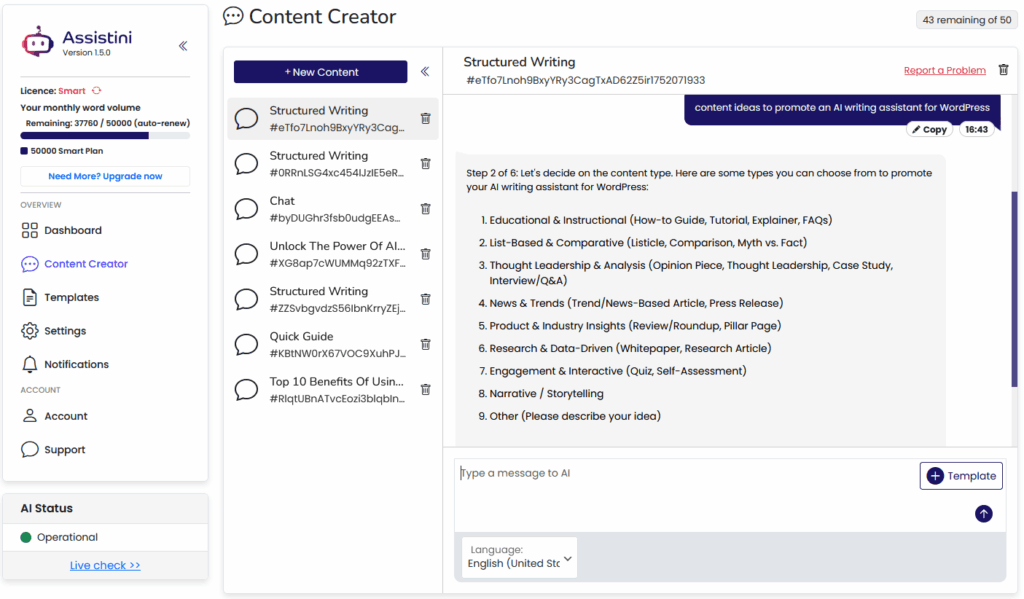
Step 3: Shaping Your Content’s “Meat” – Defining the DNA of Your Article
Next Assistini helps you shape the meat of your content by asking a short series of targeted questions. It’s all about gathering the precise “who, what, why, how” details that let Assistini produce a laser-focused outline for your post.
And this is where you really get to be the director. The tool walks you through these six simple but powerful questions. You tell it the exact angle you want to take, who you’re talking to, is it for beginners or experts. You define the main benefit, the tone of voice, how detailed it should be, and even specific examples you want to see. It takes all the guesswork out of it. So, by answering these questions, you’ve done all the strategic thinking upfront. You’re not just writing a generic prompt. You are literally creating the unique DNA for your article. making sure the final result is exactly what you had in mind.
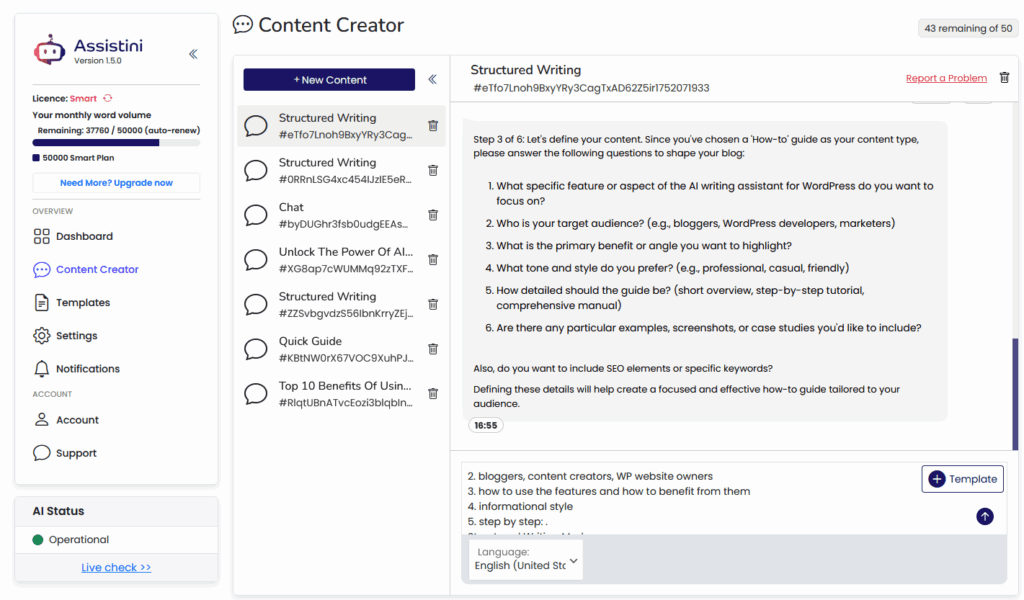
The tool helps you shape your content by asking six targeted questions:
- Feature/Angle: What specific feature or aspect do you want to focus on?
- Audience: Who is your target audience (e.g., bloggers, developers, marketers)?
- Primary Benefit: What is the main benefit or unique angle you want to highlight?
- Tone & Style: What tone and style do you prefer (e.g., professional, casual, friendly)?
- Depth of Detail: How detailed should the guide be (e.g., brief overview vs. comprehensive manual)?
- Examples/Assets: Are there any particular examples, screenshots, or case studies you’d like to include?
Optional SEO Elements: You can also choose to include SEO meta-tags or specific keywords, ensuring they are integrated into both your outline and final draft.
As soon as you hit “Send,” Assistini will take those inputs and automatically generate a draft outline.
Step 4: Outlining Your Post – Your Logical Blueprint
This is the refining step where your ideas stop being just ideas and start looking like an actual logical blueprint for an article. Based on all that info you just provided, Assistini takes the inputs you provided and turns them into a complete ready-to-review outline for your post. This ouline is tailored to your chosen topic, audience, tone, depth and SEO needs. You can make any suggestions for adding or changing. You get to see the whole structure, the intro, all the main sections, the conclusion and you can tweak it, move things around, add points, cut things out. You’re in full control of making that blueprint perfect.

Here’s what you see and how it works:
In this step your ideas transform into a logical blueprint for your article.
- This includes top-level sections like an Introduction, Key Features, How to Use Each Feature, and Benefits, complete with sub-points where needed.
- Review & Refine: You are in full control to review and refine this outline. You can:
- Reorder sections.
- Add or delete bullet points or tweak headings.
- Expand any section with extra examples or SEO keywords.
Step 5: Creating a Strong Headline – Grabbing Attention
Now, with your outline set, you need a killer headline. Here Assistini zeroes in on crafting 10 different headline options, all of them tailored specifically to the audience, tone, and benefit you defined earlier. And what’s great is the variety you get. It gives you a bunch of different marketing angles to choose from. You just pick the one you like best and you’re ready for the final most exciting step.
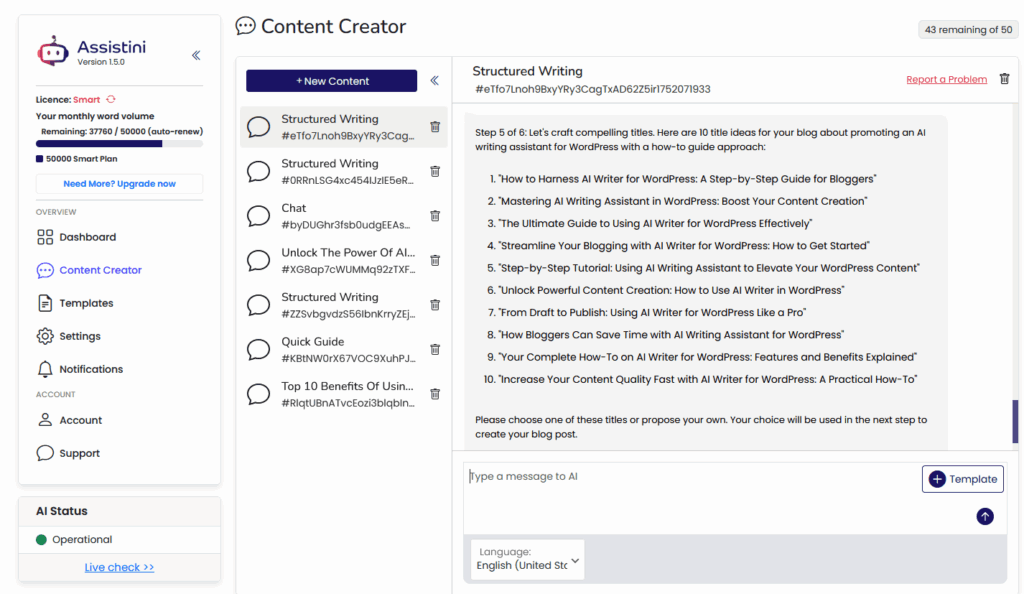
Here’s what’s happening on screen:
Explore 10 attention-grabbing titles, then pick (or tweak) the one you like best – so your final draft opens with maximum impact.
- Title Brainstorm
Assistini will create 10 different title options generated to match your content focus, audience and tone. Each one is a fully formed headline—complete with framing (“How to …,” “Mastering …,” “Unlock …,” etc.) designed to grab attention and convey value. - Variety of Angles
The list mixes:- Instructional hooks (“How to Harness AI Writer …”)
- Benefit-driven hooks (“Boost Your Content Creation”)
- Ultimate/Complete guides (“The Ultimate Guide to …”)
- Time-saving hooks (“Save Time with AI Writing Assistant”)
- Your Selection
Just pick one of these ten titles, by name or number — or type in your own custom headline.
Step 6: Full Post Generation, Final Review and Publish – Let the Magic Begin
After all the smart planning and refining, this part feels like a magic trick – the “magic button moment”. Here, Assistini takes everything you’ve locked in – your chosen title, approved outline, tone, level of detail and any SEO keywords and turns it into your complete blog post. Your finalized article appears in seconds, fully formatted and SEO-ready, so you can publish without another blank page in sight.
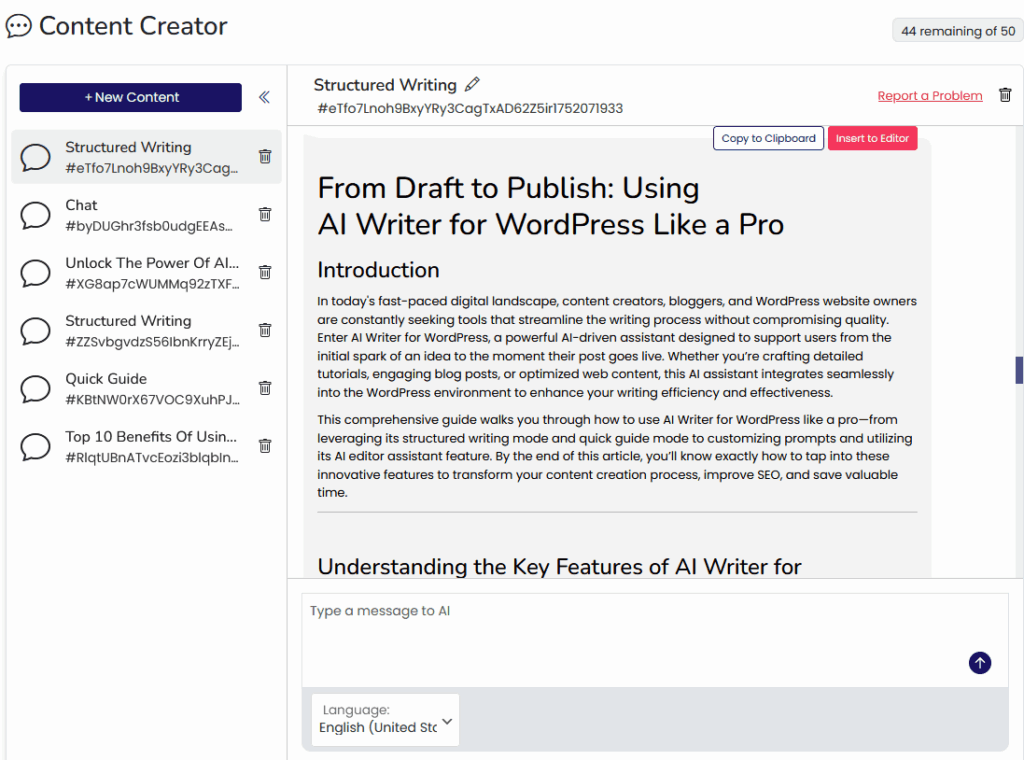

Here’s what you’re seeing in the screenshots:
- Final Text Production
In the final step, your content is assembled and polished: your selected title is rendered in full, followed by a refined introduction and a structured, multi-paragraph body. Each major heading from your outline becomes a section header. The process finishes with a ready-to-use SEO package. This includes meta title, keywords, and description, all set to be inserted into the editor with a single click. - One Last Review
You still have the chat box open beneath the draft. If you spot anything you want tweaked, rephrase a paragraph, adjust the tone, insert an extra example or just type your notes. Assistini will revise that section immediately. - Seamless Copy or Transfer to Editor
The entire draft is formatted with proper headings, paragraphs and SEO meta tags and keywords. You can now copy the draft or directly transfer it per click to your editor with all meta tags automatically filled in the right place.
You can then still review all content with the Assistini AI editor assistant before hitting publish.
Transform Your Workflow and Unleash Your Creativity
Assistini’s Structured Writing Mode is more than just another AI writing tool; it’s a completely new way of working. By putting structure and strategy first, it dramatically cuts down drafting time from hours to minutes, freeing you up to focus on bigger ideas. This approach provides more creative control, not less, allowing you to create more ambitious content..
Let’s be clear, the output you get isn’t just a giant wall of text you have to sift through. The whole point of this new workflow is to give you a complete package that’s pretty much ready to publish:
- You get the fully formatted article, of course.
- But you also get a ready-to-use metatitle for Google.
- An SEO optimized description.
- And even a handy list of SEO keywords to use.
Ready to level up your WordPress blog in minutes?
Transform your writing process and start crafting SEO-optimized, engaging posts faster than ever. You can start for free with 2,500 words and watch your content creation soar!
Don’t wait, download the Assistini WordPress Plugin now and get a 10,000-word welcome bonus to discover all the Assistini benefits.

Melanie Tamblé ist Mitgründerin und geschäftsführende Gesellschafterin der Adenion GmbH, seit 2000 ein Pionier in Business Software Solutions. Als Expertin für Online Marketing und Digital Business führt sie nun die Integration von KI in digitale Workflows an. Mit dem Assistini KI Portfolio für Unternehmen bietet die Adenion smarte Tools für KI-Wissensdatenbanken, smarte Entscheidungsprozesse, Compliance Audits und Content Creators.