
How to Create Better Content in WordPress with AI: From Writing to Images and Podcasts
Running a website today means juggling many tasks—from crafting compelling articles to creating eye-catching images and even producing engaging audio content. Yet, finding the time and resources to consistently deliver high-quality posts can feel overwhelming.
Luckily, you can now create content with AI right inside WordPress, transforming how you write, design visuals, and reach listeners without switching tools or burning out. This approach not only helps you maintain a steady publishing rhythm but also ensures your content appeals to diverse audiences through multiple formats. Discover how integrating AI into your content creation workflow makes content creation faster, smarter, and more effective than ever before.
The Everyday Challenges of Content Creation
Before talking about tools, it’s worth looking at the problems most creators deal with.
The challenge isn’t a lack of ideas. It’s the growing gap between what good content should look like and what’s realistically possible in day‑to‑day work.
1. “I Don’t Have Time to Publish Consistently.”
Many blogs start strong and then slow down. Not because motivation is gone, but because every post takes too long:
- Planning the structure
- Writing the draft
- Editing and optimizing for SEO
- Finding or creating images
Result: Content gaps, irregular publishing, and missed opportunities.
2. “My Content Is Good, But It Doesn’t Reach Enough People.”
Even well-written posts often underperform because:
- They’re text-only
- They’re hard to skim
- They don’t work for people who prefer listening
Different audiences consume content differently—but most websites only serve one format.
3. “Updating Old Content Is Even Harder Than Writing New Posts.”
Many websites have valuable older posts that:
- Are outdated
- Don’t meet current SEO standards
- Are hard to revise without rewriting everything
So they stay untouched—even though they could still perform well.
4. “I’m Juggling Too Many Tools.”
Writing in one tool, editing in another, designing images somewhere else, experimenting with audio externally—this fragmentation slows everything down and breaks focus.
What most creators really need is fewer tools, not more features.
What a Sustainable Content Creation Workflow Actually Looks Like
For most website owners, a realistic workflow needs to be:
- Flexible (not every post is the same)
- Fast enough to fit into busy schedules
- Consistent in quality and style
- Easy to repeat over months or years
This is where Assistini fits in—not as a replacement for creativity, but as a workflow companion inside WordPress.
1. AI Writing: From Blank Page to Polished Draft
1.1 Starting a Post Without Staring at a Blank Page
You know what you want to write about—but not how to start or structure it?
Assistini can guide you through the early decisions that usually block progress:
- What is the main goal of the post?
- Who is it for?
- Which angle makes sense?
Instead of generating random text, it helps you:
- Build a clear outline
- Decide on headings before writing
- Align structure with search intent
Practical advice: Spend time reviewing the outline before generating the full text. A strong structure saves more time than rewriting paragraphs later.
1.2 Writing Faster Without Losing Your Voice
You want to publish regularly—but every draft takes too long?
Once the structure is clear, Assistini can create a full draft that:
- Follows your tone
- Uses your chosen keywords
- Includes SEO elements like meta titles and descriptions
You stay in control of the direction, while the AI handles the heavy lifting.
Practical advice: Save your preferred tone, length, and structure as templates. This is especially useful for recurring formats like guides, updates, or product-related posts.
1.3 Editing and Improving Content Where You Actually Work
You have a draft—or an older post—but editing feels tedious?
Instead of copying text into external tools, Assistini works directly inside the WordPress editor. You can:
- Improve introductions
- Simplify long paragraphs
- Add summaries, FAQs, or CTAs
- Optimize SEO without rewriting everything
This makes it realistic to:
- Refresh older posts
- Improve clarity incrementally
- Keep evergreen content relevant
Practical advice: Start by updating introductions and conclusions first. Small changes often have a big impact on engagement.
How Assistini helps you to work efficiently
The core of Assistini is its ability to handle the “heavy lifting” of writing. Whether you are battling writer’s block or need to scale production, Assistini offers specialized modes:
- Structured Writing: A 6-stage guided workflow that takes you from a vague topic to a full article with SEO meta tags.
- Quick Guide: Ideal for when you already have the ideas but need them organized into a publish-ready draft in just 5 clicks.
- AI Editor Assistant: A “co-pilot” inside the WordPress block editor that helps you rewrite paragraphs, generate FAQs, or optimize for keywords on the fly.
2. AI Image Creation: Visuals That Support Your Message
You need an image, but stock photos feel generic and disconnected, and designing takes time?
Assistini allows you to create or adjust images using simple text descriptions:
- Generate visuals that actually match your topic
- Adjust style and mood to fit your brand
- Improve existing images instead of replacing them
Assistini’s Image Creator and Editor allow you to generate custom visuals that fit your brand perfectly.
- Use the Image Creator to generate images based directly on your post content. Simply select a style like “Photorealism” or “Minimalism” to ensure your site looks cohesive.
- Use the Image Editor to modify existing photos with simple text commands. For example, you can tell the AI to “add a slice of bread next to the jar” or “make the background brighter” to save hours in Photoshop. .
Example image prompt for this blog post
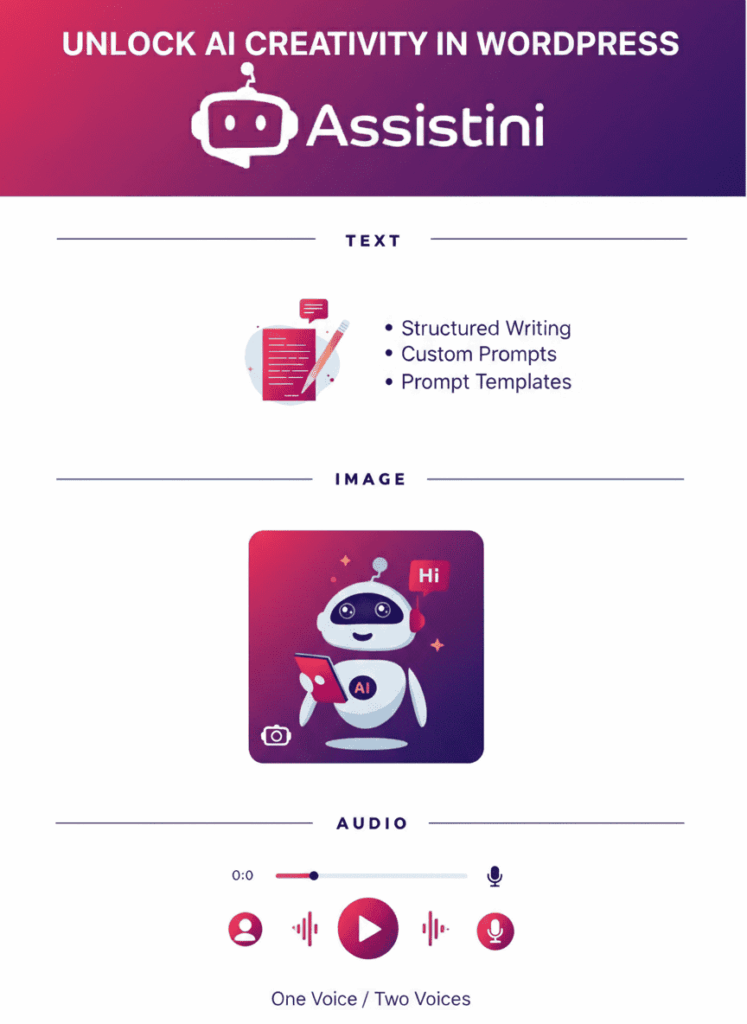
Prompt: A professional and clean infographic-style layout to illustrate the key elements of this blog post. At the top, a bold header reads “Unlock AI Creativity in WordPress” followed by the Assistini logo against a vibrant gradient background of deep violet and bright magenta. Below the header, three distinct sections are organized horizontally:
- TEXT: Featuring a stylized document icon with a pencil, accompanied by bullet points: “Structured Writing”, “Custom Prompts”, and “Prompt Templates”.
- IMAGE: Showing a friendly, modern white AI robot character holding a digital tablet, surrounded by floating icons representing photography and creative editing.
- AUDIO: Displaying a sleek waveform and a play button, with the text “One Voice / Two Voices” underneath.
Style instructions:
- Style: Flat vector illustration with modern UI/UX design elements.
- Colors: Use a color palette of deep navy blue (#1B1464), magenta-pink (#F5365C), and soft light blue accents.
- Composition: Centered, symmetrical, high-resolution, with sharp lines and professional typography.
Why This Prompt Works
- Structured Hierarchy: By explicitly naming the sections (Text, Image, Audio), you guide the AI to organize the features logically just like your workflow.
- Specific Details: Including specific UI elements like “waveforms” and “document icons” ensures the visual represents digital content creation rather than generic art.
- Brand Consistency: Defining the hex-style colors and the “friendly AI robot” keeps the imagery aligned with the professional yet accessible Assistini brand voice.
Practical tip:
Define one or two consistent image styles (e.g. clean illustrations or realistic photos) to keep your site visually coherent. You can save your style prompts to ensure a consistent brand identity
Learn more about AI image editing and examples for image prompting
3. AI Podcasts: Reaching People Who Prefer Listening
Your content is solid—but some people just don’t read long posts. Many of your potential followers don’t have time to read 2,000-word guides—they prefer to listen while commuting or exercising.
Assistini lets you turn blog posts into podcasts without recording. The Audio Podcast Generator turns your written post into a natural-sounding audio version in minutes. The audio can be embedded directly into your post.
- Two Styles for Better Engagement:
- One Voice: Single‑speaker versions for clear explanations. Best for tutorials and educational guides.
- Two Voices: Two‑speaker conversations for more engaging formats. Assistini creates a conversational dialogue between two speakers, making complex topics feel easier to follow and more entertaining.
Practical advice: Add additional instructions or introductions to give your podcast conversations a unique voice.
Listen to an example for this blog post:
Learn more about creating podcasts from your blog posts.
Master Content Creation by Turning Your Daily Chores into a Repeatable AI Workflow
Here’s how many content creators use Assistini AI in practice:
- Plan and draft a post with AI support
- Edit and optimize directly in WordPress
- Add a matching image
- Create an audio version for listeners
- Publish and reuse the content
One idea becomes multiple assets—without multiplying effort.
Why This AI Content Creation Workflow Scales
By integrating writing, images, and audio into one dashboard, you solve the biggest bottleneck for website owners: Time.
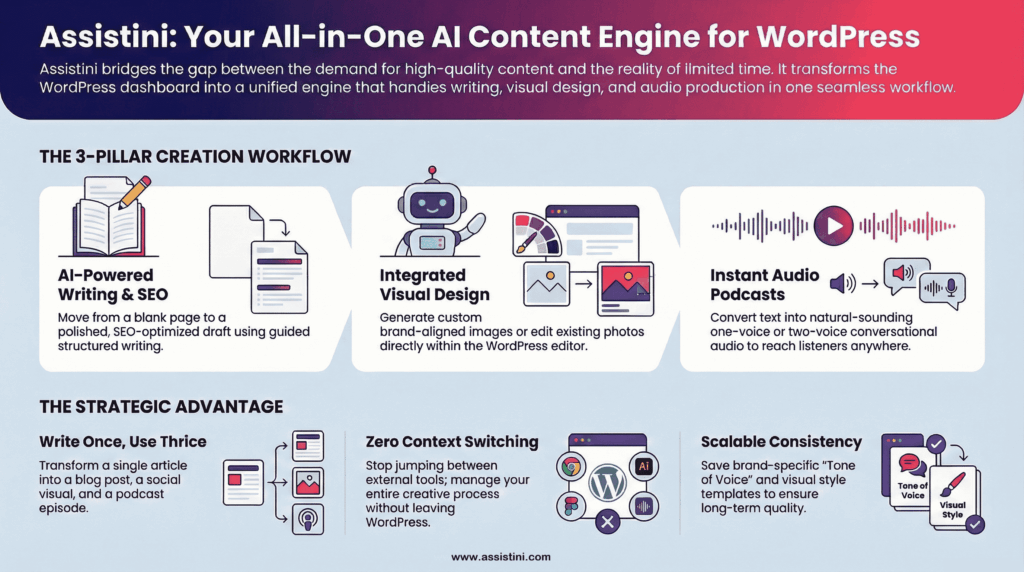
- Write Once, Use Thrice: One article becomes a blog post, a social media visual, and a podcast episode.
- No Context Switching: You don’t need to log into Canva, Spotify, or ChatGPT. Everything stays in WordPress.
- Consistency: Save your brand’s “Tone of Voice” or “Visual Style” as templates to ensure every piece of content sounds and looks like you.
Why This Matters Long Term
Sustainable content creation isn’t about publishing more—it’s about:
- Reducing friction
- Reusing good ideas
- Reaching different audiences
- Keeping content manageable over time
Assistini supports these goals by fitting into how WordPress users actually work.
Create Content With AI That Fits Your Reality
Assistini doesn’t promise perfect content at the push of a button. What it offers is something more valuable: a practical way to create, improve, and reuse content inside WordPress—without burning out.
If you’re a website owner, blogger, or content creator who wants to publish consistently, reach more people, and stay in control of quality, Assistini gives you the structure and flexibility to do exactly that.
Ready to see it in action? Install Assistini today and start experiencing effortless, high-speed writing and optimized publishing right inside your WordPress site.

Melanie Tamblé ist Mitgründerin und geschäftsführende Gesellschafterin der Adenion GmbH, seit 2000 ein Pionier in Business Software Solutions. Als Expertin für Online Marketing und Digital Business führt sie nun die Integration von KI in digitale Workflows an. Mit dem Assistini KI Portfolio für Unternehmen bietet die Adenion smarte Tools für KI-Wissensdatenbanken, smarte Entscheidungsprozesse, Compliance Audits und Content Creators.